🚨 NEW — under 30 lifetime connections — Top priority
You don’t have a pipeline yet, so the training IS the work. Block time every day until all 5 courses are done.
📅 PAR — at or below average metrics — Steady pace
Knock out a course every few days until you’re finished.
⭐ ACE — hitting or exceeding metrics — Strongly recommended
No hard deadline. Structured walkthrough of how Scofield Group operates today — worth 6–8 hours even at your level.
Not sure which tier you’re in? Check SG Metrics in SG Hub. If you’re still not sure, treat training as top priority.
Still need help? Email [email protected] or submit a ticket above — we respond within 24 business hours.
Knowledge Base & FAQ
Answers to the most common questions about logging in, completing training, and getting cleared to go LIVE.
Logging In & Account Setup
How do I create my SG Basecamp account?
Click Log In at the top right of any page, then click Register under the login form. Enter your name and your @scofieldgroup.com email (other domains are blocked). You’ll receive a “Login Details” email within 1–2 minutes with a password reset link.
Why won’t my personal Gmail or other email work?
Registration is restricted to @scofieldgroup.com email addresses only. This keeps the LMS secure to the SG team. If you don’t have your SG inbox set up yet, email [email protected] and we’ll fix it today.
I forgot my password. How do I reset it?
Go to the password reset page and enter your @scofieldgroup.com email. You’ll get a reset link within minutes. Check spam if you don’t see it.
Where do I land after I log in?
You’ll land automatically on the Courses page where the 5 training courses are listed. Click Course 1 to start.
The 5 Courses
How many courses do I need to complete?
Five. In this order: 1) Introduction to Scofield Group LMS, 2) ICA & Brokerage Policy Training, 3) Required Disclosures & Pre-Showing Agreements, 4) Phase 1 — System Setup, 5) Phase 2 — Core Training & Go Live. Each one runs lesson → quiz → lesson → quiz → Final Exam.
Do I have to complete courses in order?
Yes. Each course locks until the previous one is finished. The LMS enforces this automatically.
How do quizzes work?
All quizzes are multiple choice. You need 80% to pass and move to the next lesson. If you don’t pass, retake it — no limit. Final Exams at the end of each course follow the same rule.
Are there assignments to submit?
No. The LMS is multiple choice only. Live contract reps, CMAs, and 500 dials all happen with Aaron during the in-office 5-Day Orientation — not through the LMS.
How long does the full LMS take?
Most agents complete all 5 courses in 6–10 hours total, spread over a few days. The 5-Day Orientation with Aaron is a separate in-office week that follows the LMS.
A lesson shows incomplete after I finished it — what do I do?
Scroll to the very bottom of the lesson and click Mark Complete. If the button doesn’t appear, try a different browser or clear your cache. Still stuck? Submit a support ticket.
Master Onboarding Packet & 5-Day Orientation
What is the Master Onboarding Packet?
It’s the single printable doc you bring to Day 1 with Aaron. It contains: the Platform Setup checklist, the 5-Day Commitment Agreement, 5 daily tracking sheets (100 dials + Aaron contract rep per day), and the End-of-Week proficiency check. Download from the Onboarding Checklist page or directly here.
What is the 5-Day Orientation?
After you pass all 5 LMS courses, you spend 5 in-office days with Aaron writing real contracts page-by-page, running CMA comp reps, and putting down 100 dials per day (500 total). Aaron’s signature on the End-of-Week sheet is what clears you to go LIVE on real clients.
What do I need to bring to Day 1 with Aaron?
The printed Master Onboarding Packet (signed Commitment Agreement), your laptop, your phone, and your full attention. 9 AM – 5 PM, Mon–Fri.
Getting Answers
Where do I get answers to process questions?
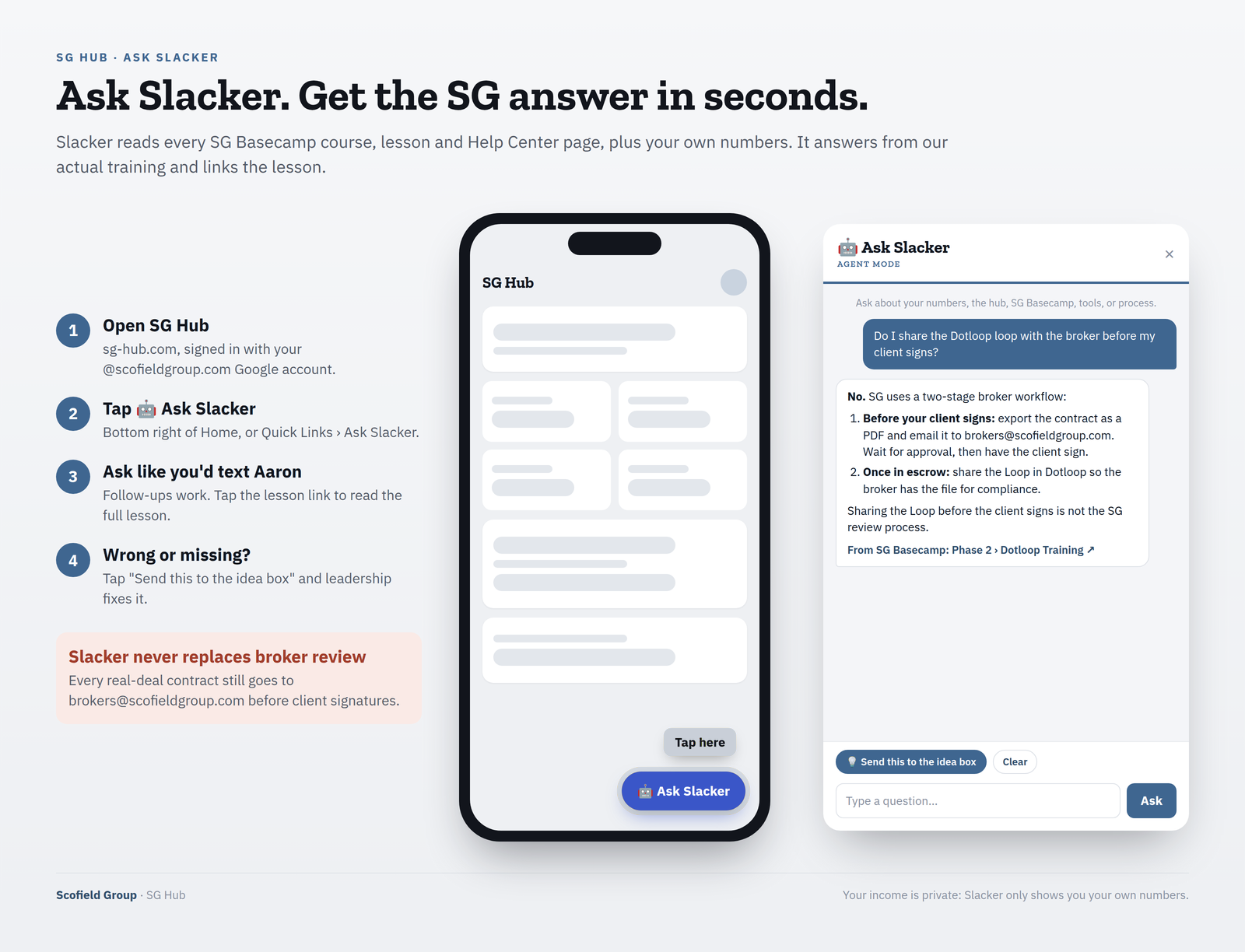
Ask Slacker in SG Hub first (🤖 Ask Slacker, bottom right of Home). If you still need help, ask Aaron.
Where do deal-specific questions go?
Always to [email protected]. Every real-deal contract also goes there for broker review before client signatures.
What needs a broker review before my client signs?
Your first three offers and your first listing. Send the contract, the comps (QuickCMA version) and the pre-approval or proof of funds to [email protected] before client signatures. After that, always CC [email protected] on every deal.
Where do I ask training questions?
Ask Slacker in SG Hub first. Still stuck? Ask Aaron in the office, Monday–Friday, 9–5 — not by text and not through your ambassador.
On the sg-hub.com Home page, tap the 🤖 Ask Slacker button (bottom right), or go to Quick Links › Ask Slacker.
Can Slacker approve my contract?
No. Every real-deal contract goes to [email protected] for broker review before client signatures, always.
Can other agents see my numbers in Slacker?
No. You only ever see your own numbers, never another agent’s.
Phone AI / company line calls
Why didn’t the Phone AI ring me?
Check that (725) 325-7088 is saved in your phone and allowed through Focus / Do Not Disturb, and that your cell on the SG Contact List is correct (shown on your SG Hub Profile). If your cell is wrong, tell Aaron.
What do I press on a Phone AI call?
Press 1, within 8 seconds. If you don’t press 1, the caller is not connected.
I missed a Phone AI transfer, now what?
Check your email and your FUB tasks. Call the client back within the hour, then complete the task in FUB.
Who hears that the call is recorded?
Every caller. The AI says so at the start of the call.
Systems & Tools
What systems do I need set up before I go LIVE?
Gmail (SG email + signature), Zillow Pro (bio, headshot, license #, on SG team), Follow Up Boss (headshot, Smart Lists), Ylopo (verify branded URL works), SG Hub (sg-hub.com login works), Zoodealio (test buyer + property entered), Zillow Showcase, Dotloop. Course 4 (Phase 1 — System Setup) walks through every one of these step-by-step.
What is Zoodealio and how is it different from Opendoor or Offerpad?
Zoodealio is an iBuyer — a cash-offer platform — and it is Scofield Group’s direct partnership. We also work with Opendoor and Offerpad. On listings, we pitch the full iBuyer menu so the seller has all three cash-offer options. Every closed client and every listing lead goes into both Ylopo Seller Alerts and Zoodealio.
I’m stuck setting up one of the systems — who do I contact?
On every real-deal contract before client signatures (for broker review), and on any deal-specific broker issue (disputes, escalations, gray-area situations). Not on routine emails.
Can I send a real-deal contract without Aaron / brokers@ review?
No exceptions. All real-deal contracts get Aaron / brokers@ review first. This is in your 5-Day Commitment.
What is A.L.M.?
Appointment (lock the appointment) · Location (identify the location) · Motivation (uncover the motivation). Run it on every connection call.
What are the Three Pillars?
Accountability · Tech · Adaptability. The three traits we measure SG agents against.
Where do I find the Independent Contractor Agreement (ICA)?
Within 24 business hours. Locked-out-of-account issues are prioritized.
I spotted a wrong answer or broken link in a quiz.
Email [email protected] with the URL of the page and the specific issue. We fix within 24 hours. This is part of the work — the LMS only stays sharp if you flag what’s off.
Can I call or text for support?
Email (or ticket) is the primary channel so nothing falls through the cracks. For urgent contract questions, email [email protected].