
16. SG Hub: Slacker & the Phone AI
This lesson covers two SG Hub features: Slacker, the SG Hub AI assistant, and the Phone AI receptionist that answers the company line and transfers new buyer and seller callers to you.
What SG Hub is
SG Hub is at sg-hub.com. Sign in with your @scofieldgroup.com Google account.
Slacker lives in SG Hub. Your cell number on the SG Contact List, shown on your SG Hub Profile, is the number the Phone AI rings when it transfers a call to you. The earlier lessons in this course walk through every SG Hub screen.
Ask Slacker
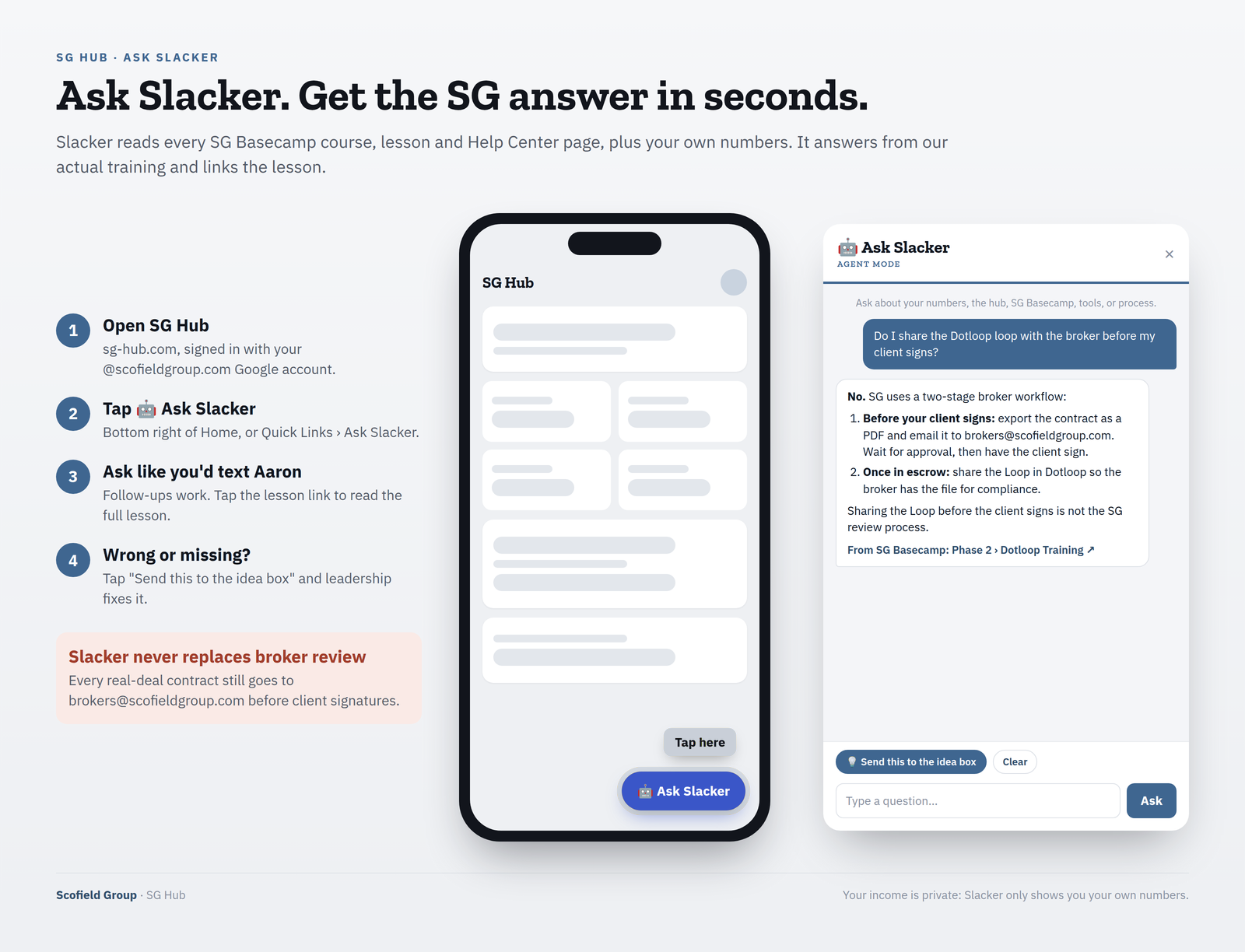
Example shown above: asked “Do I share the Dotloop loop with the broker before my client signs?”, Slacker answers No. Before your client signs, export the contract as a PDF, email it to [email protected] and wait for broker approval. Once in escrow, share the Loop in Dotloop so the broker has the file for compliance. The answer links to Phase 2 › Dotloop Training.
How to open Slacker
- On the SG Hub Home page, tap the 🤖 Ask Slacker button at the bottom right, or
- Go to Quick Links › Ask Slacker.
How to ask
Ask it the way you’d text Aaron. Follow-up questions work: Slacker remembers the conversation until you tap Clear.
What Slacker knows
- Every SG Basecamp course, lesson and Help Center page (refreshed daily).
- Your own production numbers (sides, volume, pipeline).
- Hub tools such as the calculators and seller net sheet.
- The SG Contact List.
Answers that come from Basecamp end with the lesson link. Click it to read the full lesson.
When Basecamp doesn’t cover it
If Basecamp doesn’t cover something, Slacker says so and points you to Aaron. It does not guess contract rules.
Slacker does not replace broker review
Every real-deal contract still goes to [email protected] before client signatures.
Privacy
Agents only ever see their own income, never another agent’s.
Wrong answer or a gap?
Tap 💡 Send this to the idea box in the chat. The whole conversation goes to leadership.
Example questions
- “My buyer’s appraisal is delayed. What do I do and by when?”
- “Do I share the Dotloop loop with the broker before my client signs?”
- “What do I send brokers@ for review on my first offers?”
- “How do I set up my Smart Lists in FUB?”
- “What is A.L.M.?”
- “What’s in my pipeline?”
The Phone AI receptionist
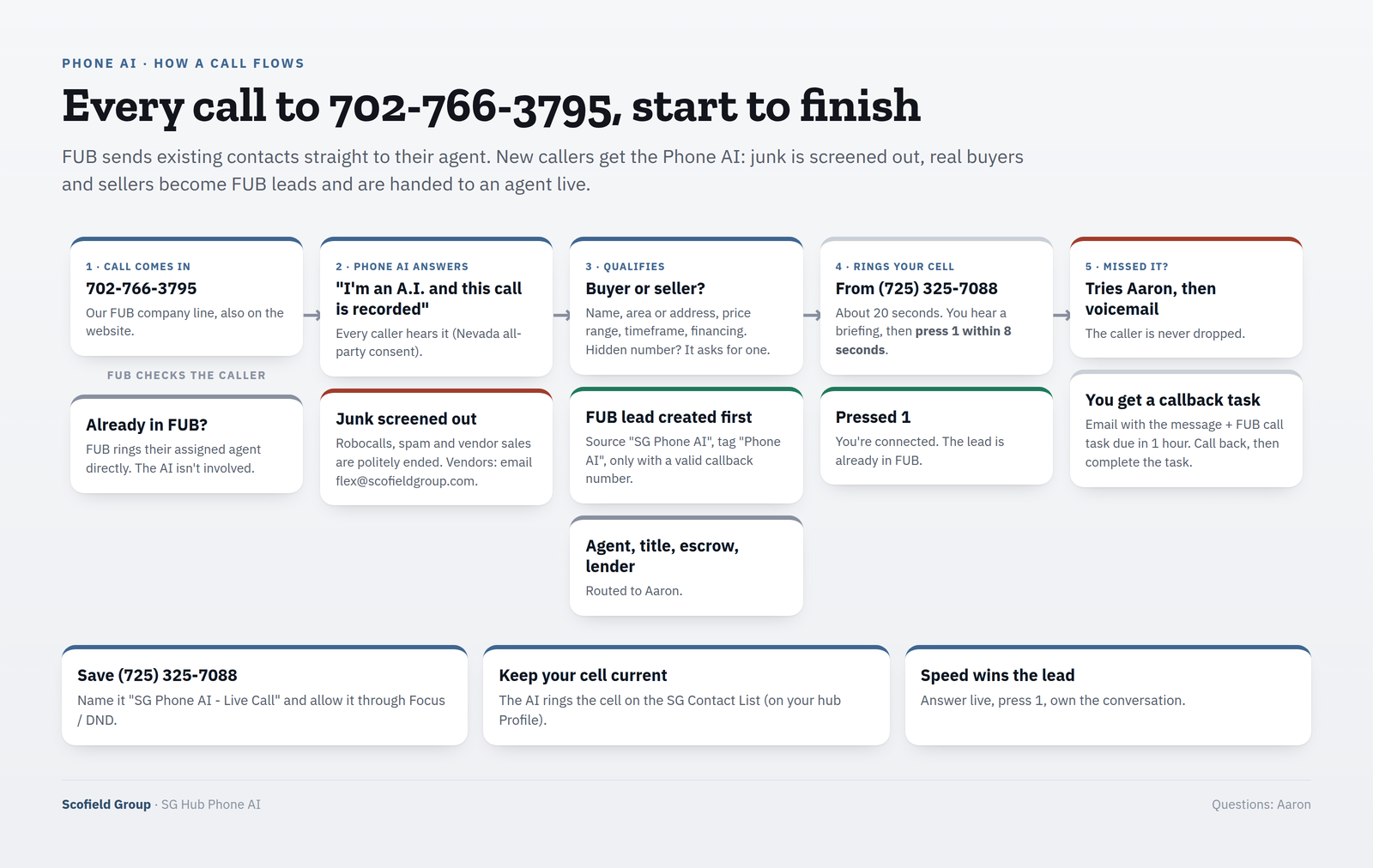
The Phone AI answers the company line, 702-766-3795. That is the FUB company number, and it is also on the website.
- Callers who are already in Follow Up Boss are routed by FUB straight to their assigned agent. The Phone AI handles new and unknown callers.
- It tells every caller that it is an A.I. and that the call is recorded. Nevada requires all-party consent.
- It screens out robocalls, spam and vendor sales calls. Vendors are told to email [email protected].
- Agent/broker, title, escrow and lender calls go to Aaron.
Buyers and sellers
- It asks for name, area or address, price range, timeframe and financing.
- It creates the FUB lead (source “SG Phone AI”, tag “Phone AI”) before transferring, so the lead is already in FUB when your phone rings.
- It only creates a lead when there’s a valid callback number.
- If caller ID is hidden, it asks for the number and reads it back.
Save the Phone AI number
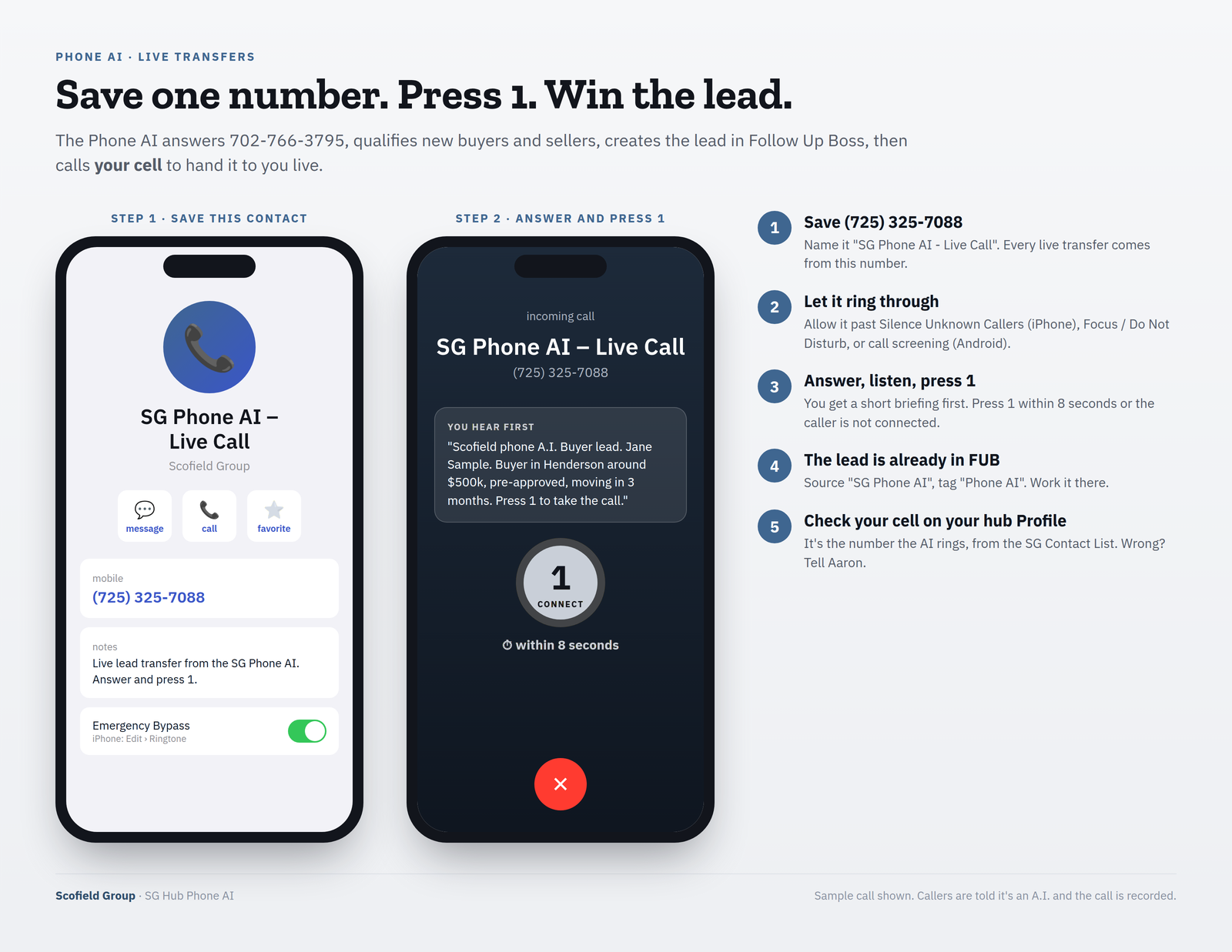
Every live transfer comes from (725) 325-7088. Save it in your phone as “SG Phone AI – Live Call”.
If you use Silence Unknown Callers (iPhone), Focus / Do Not Disturb, or call screening (Android), allow that contact. Otherwise transfers go to voicemail.
iPhone tip: open the contact › Edit › Ringtone › turn on Emergency Bypass so transfers ring through Focus / Do Not Disturb.
The number the Phone AI rings is your cell on the SG Contact List, shown on your SG Hub Profile. If it’s wrong, tell Aaron.
Taking a transferred call
- Answer. You hear a short briefing: “Scofield phone A.I. [Buyer lead]. [Name]. [What they want].”
- Press 1 within 8 seconds to connect. No 1 = the caller is not connected.
- The lead is already in FUB. Work it there.
Answer live and press 1. Speed wins the lead.
Missed calls and callbacks
- The Phone AI rings you for about 20 seconds.
- If you miss it, it tries Aaron. If Aaron misses, the caller leaves a voicemail. The caller is never dropped.
- You get the message by email, plus a FUB call task due in 1 hour.
- Call back, then complete the task in FUB. Leadership tracks open callbacks.
Common questions
Where is Slacker?
On the sg-hub.com Home page, tap the 🤖 Ask Slacker button (bottom right), or go to Quick Links › Ask Slacker.
Can Slacker approve my contract?
No. Broker review via [email protected] before client signatures, always.
Can other agents see my numbers in Slacker?
No. Only your own.
Why didn’t the Phone AI ring me?
Check that (725) 325-7088 is saved and allowed through Focus / Do Not Disturb, and that your cell on the SG Contact List is correct.
What do I press on a Phone AI call?
1, within 8 seconds.
I missed a Phone AI transfer, now what?
Check your email and your FUB tasks. Call back within the hour and complete the task.
Who hears that the call is recorded?
Every caller. The AI says so at the start.
Before you click Mark Complete
- ☐ Signed in to sg-hub.com
- ☐ Asked Slacker one question
- ☐ Saved (725) 325-7088
- ☐ Checked my cell on my hub Profile