7. Live Daily Tracker and Pond Calling
SG HUB · LESSON 7
Trackers
Two weekly trackers in the Quick Links sidebar, under TRACKERS.
Live Daily Tracker
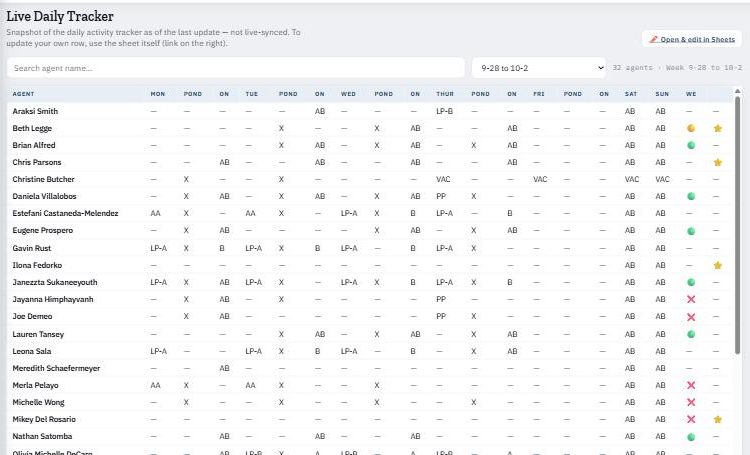
Shows, for every day of the week, which team you went LIVE on and whether you joined pond calls. Pick the week from the dropdown and search your name.
| Code | Meaning |
|---|---|
| A | You went LIVE on Team A that day. |
| B | You went LIVE on Team B that day. |
| AB | You went LIVE on both Team A and Team B that day. |
| X | In the Pond column: you took part in pond calls that day. |
| LP-A / LP-B / LP-A/B | Below the Zillow raw-conversion minimum on Team A, Team B or both (see Lesson 6). |
| AA | Aaron Accountability — schedule a 1-on-1 with Aaron. |
Pond Calling Tracker
Your pond dials by day — total dials, connections and the week’s totals. NEW agents live here while building their pipeline; everyone else uses ponds when they want more at-bats.
How to update your row
Both trackers are snapshots — not live-synced. To update your own row, click Open & edit in Sheets and edit the sheet directly.