
Listing Process
📖 4 min read
📄
Listing Agreement
SG Exclusive Right to Sell — full contract. Use as your reference while you fill it out.
📝
Sellers Real Property Disclosure
SRPD form (Rev. 06/2023) — must be filled out and signed by the Seller.
The listing process is how you take a home to market. Every line of the Listing Agreement matters — what you do here protects the brokerage, the seller, and your commission. Use the contract above as your reference. Every bullet in this lesson is a quiz question.
Part 1 — Filling Out the Listing Agreement
Term, Parcel, Price & Commission
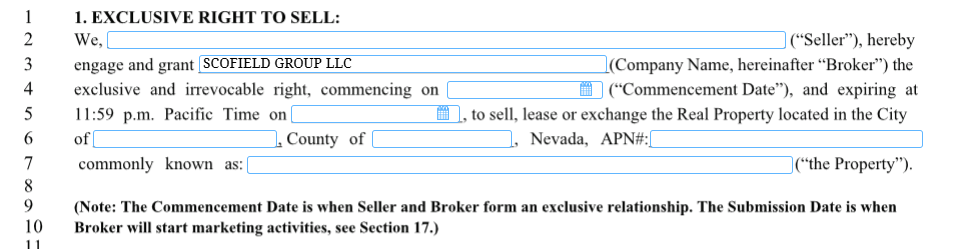
- Line 4–5 — Start & End Date: Listing must have both. 1 year is normal.
- Line 6 — Parcel #: Parcel # is more important than the address. Always verify it.
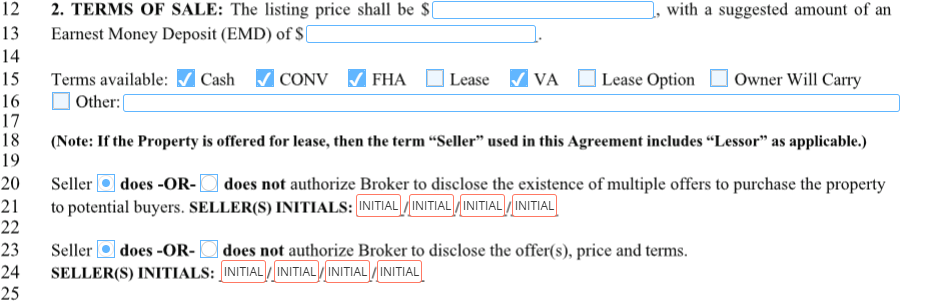
- Line 12 — Listing Price: The seller decides the price. Have the seller sign the comps with the price they recommend.
- Line 13 — EMD: Usually 1% of Purchase Price. Round up.
Acceptable Financing & Seller Control
- Line 15 — Acceptable Financing: For most properties, all are checked but Lease, Lease Option, and OWC — unless the seller wants CASH only.
- If Hard Money is acceptable: Check CASH and CONV. CONV can mean Conforming, ARM, or Hard Money.
- Line 20 & 23 — Seller Control: The seller has the right to control here. Line 23 is a LIFESAVER in negotiating BOTH sides.
Inclusions, Exclusions & Smart Devices
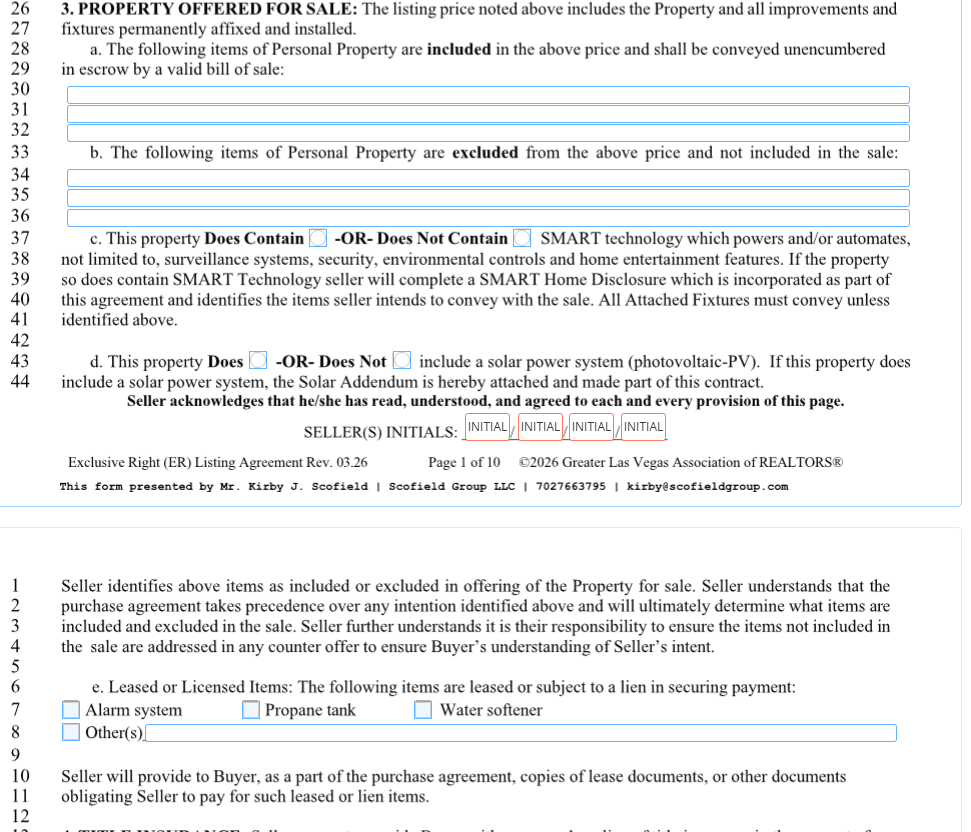
- Line 30–32 — Inclusions: Specify every appliance that is NOT built-in.
- Line 34–36 — Exclusions: Specify anything the seller chooses NOT to include.
- Line 43 — Smart Devices: Includes Ring doorbells, Nest thermostats, and camera systems. Always address them.
Leased Equipment
- Line 6–8 — Leased Equipment: Specify any leased equipment. Obtain a copy of the lease from the seller.
Commission Total & Transaction Fee
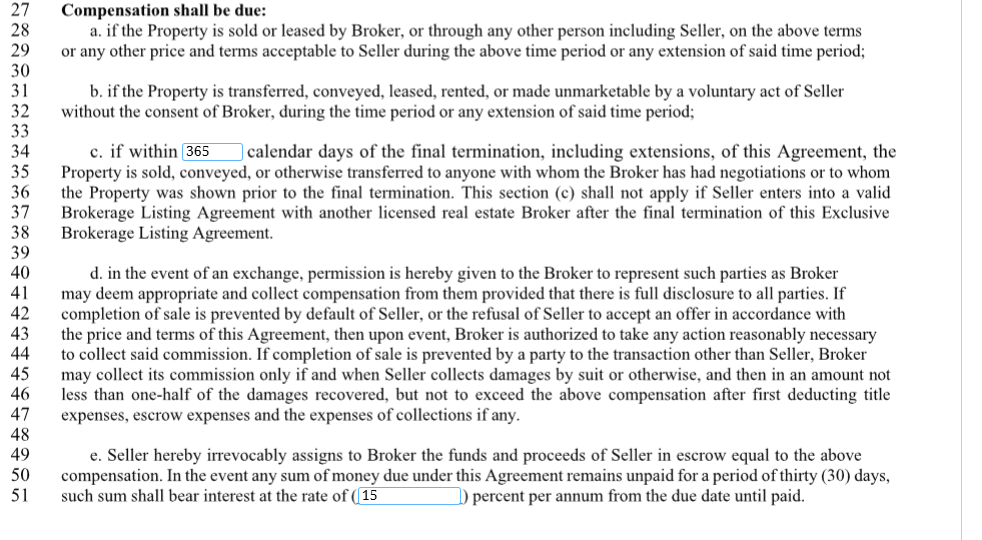
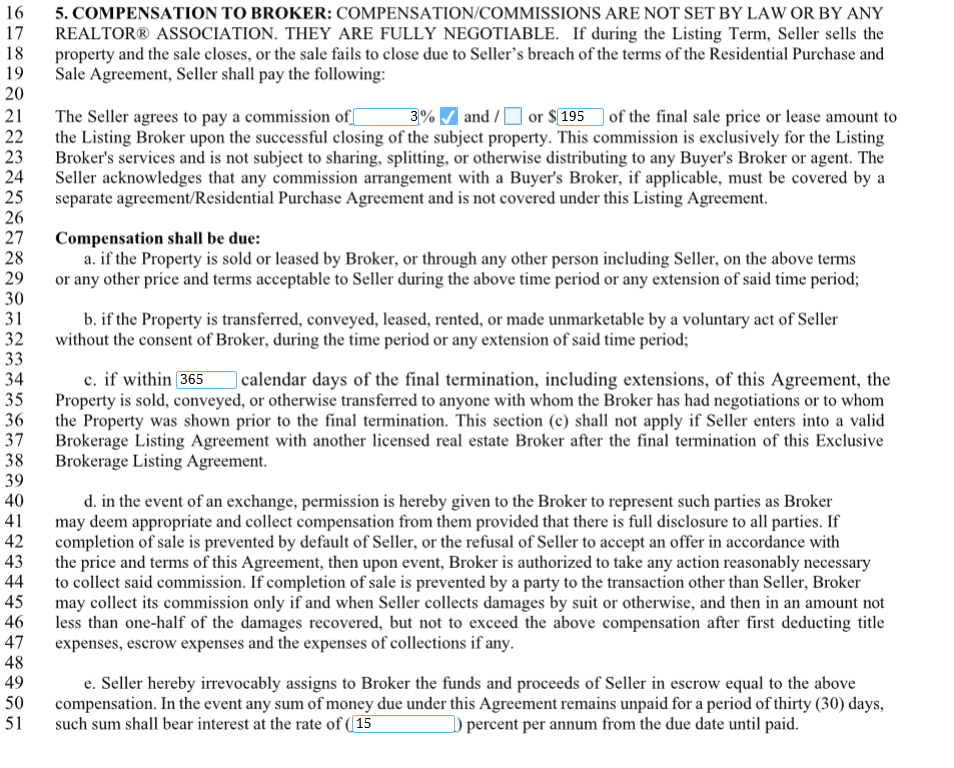
- Line 21 — Total %: Make sure total % is listed here AND the $195 transaction fee is listed as AND.
Escrow Holder & Required Disclosures

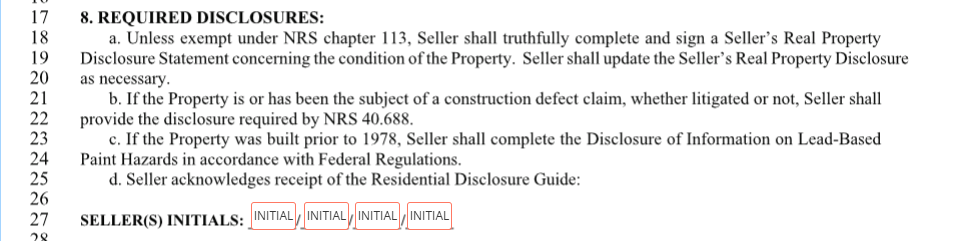
- Line 5 — Escrow Holder: Always identify the Escrow Holder.
- SRPD: The Seller’s Real Property Disclosure must be filled out by law by the Seller.
- Lead Based Paint: Required if the home is built 1978 or older.
- RDG: Initial for the Residential Disclosure Guide.
HOA Verification
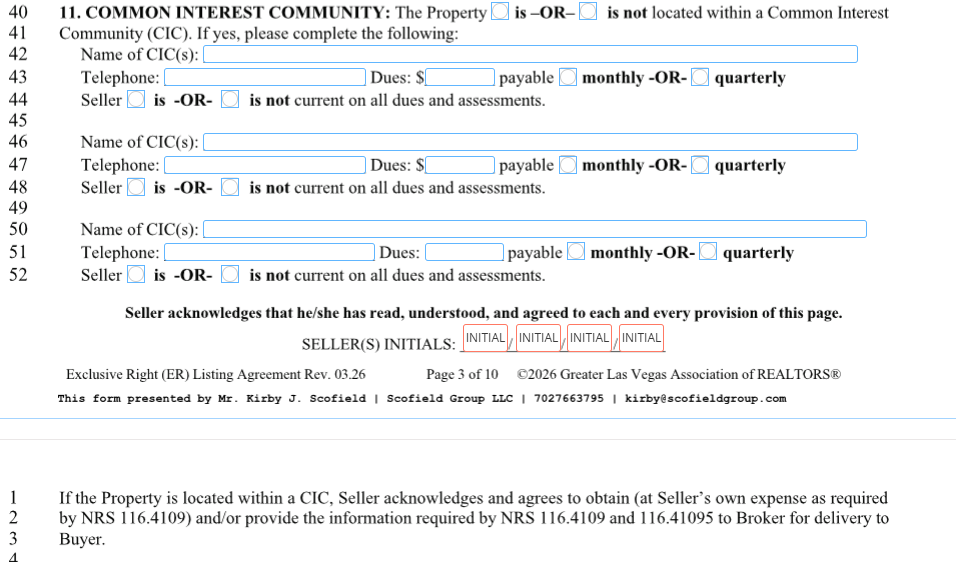

- HOA info: Ask the seller for HOA info and verify if there is a 2nd HOA or a Master HOA.
- Verify balance: Look up the home on amgnv.com to verify if there is a balance.
Best Method & Property Access
- Line 12 — Best Method: Verify the best method of contact with the seller.
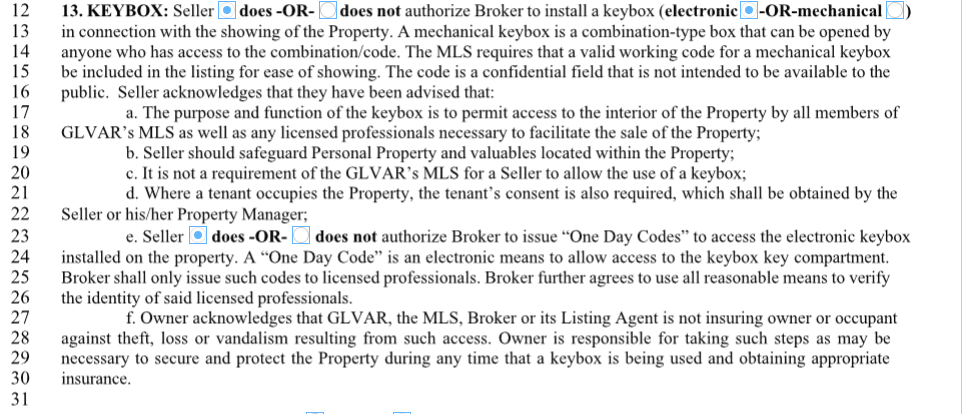
- Line 23 — Access: Verify with the seller. Explain that it is used for inspectors, appraisers, and vendors.
FIRPTA
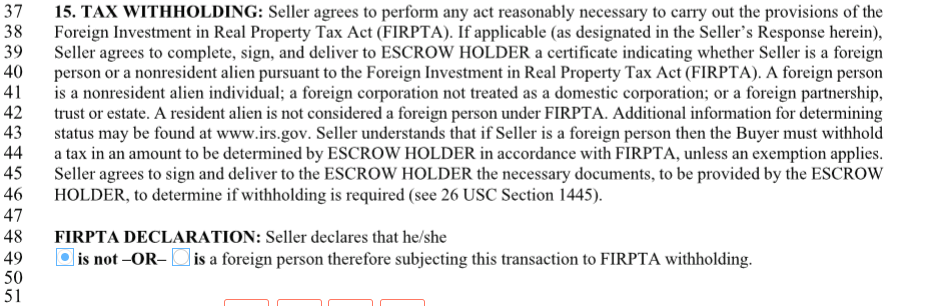
- FIRPTA: Average of 10% is withheld at COE, paid from the buyer. File the tax form — it is just a paper trail.
Signatures
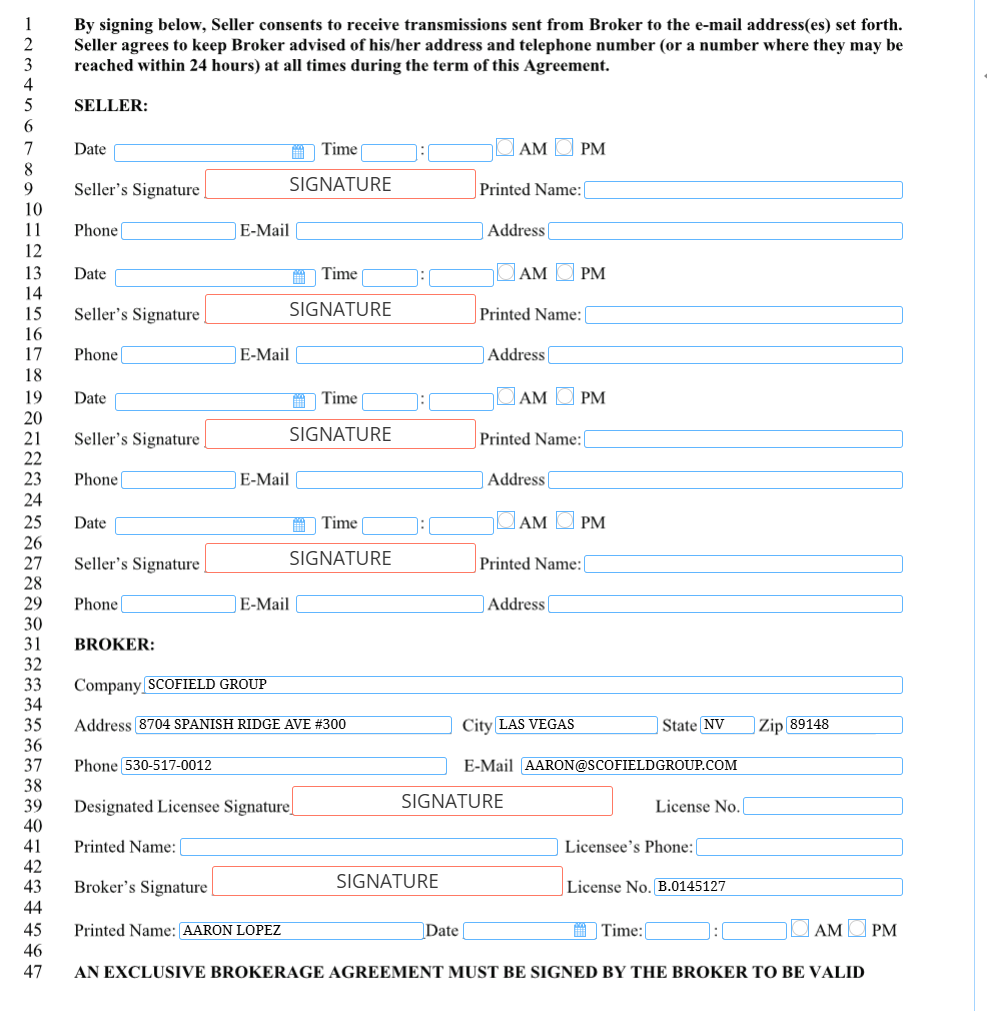
- 100% Signed: The Listing Agreement must be 100% signed for us to accept the listing.
Sign Preferences & HOA Sign Restrictions

- Line 51 — Signs: Discuss sign preference with the seller. Always call the HOA for sign restrictions.
Syndication Initial
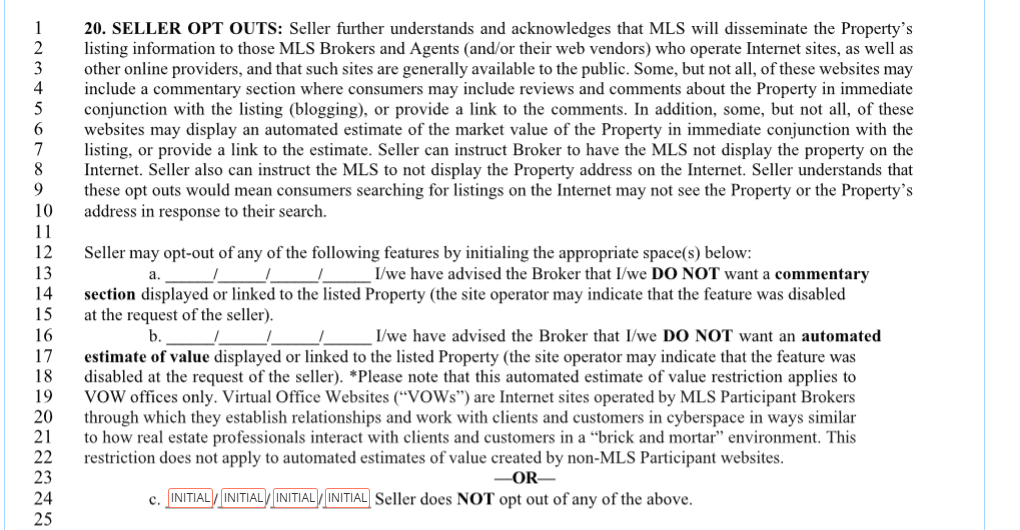
- Initial Line “c.”: Must be initialed for us to syndicate the listing.
Office Exclusive, Coming Soon & Opt-Outs

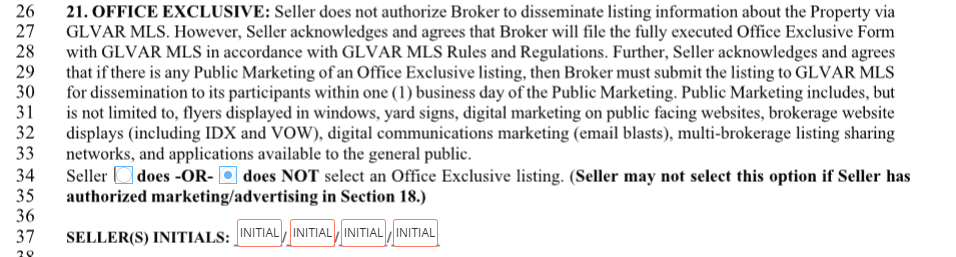
- Line 34 — Office Exclusive: Not Office Exclusive if syndicating.
- Coming Soon Listing (CSL): Up to 30 days.
- Opt-outs: Opt out of automated commentary and automated estimate. Add the proper verbiage.
Payments, UCNS vs UCS, 1031 & Compliance

- Payments: Don’t assume payments are current. Verify.
- UCNS vs UCS: Discuss the difference with the seller (Under Contract No Show vs. Under Contract Show).
- 1031 Exchange: Discuss the 1031 Exchange option with the seller.
- Date & Time: Always complete the date and time for compliance.
Part 2 — Seller’s Real Property Disclosure (SRPD)
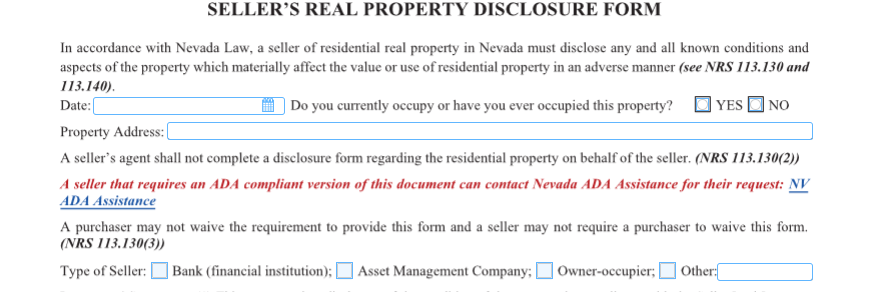
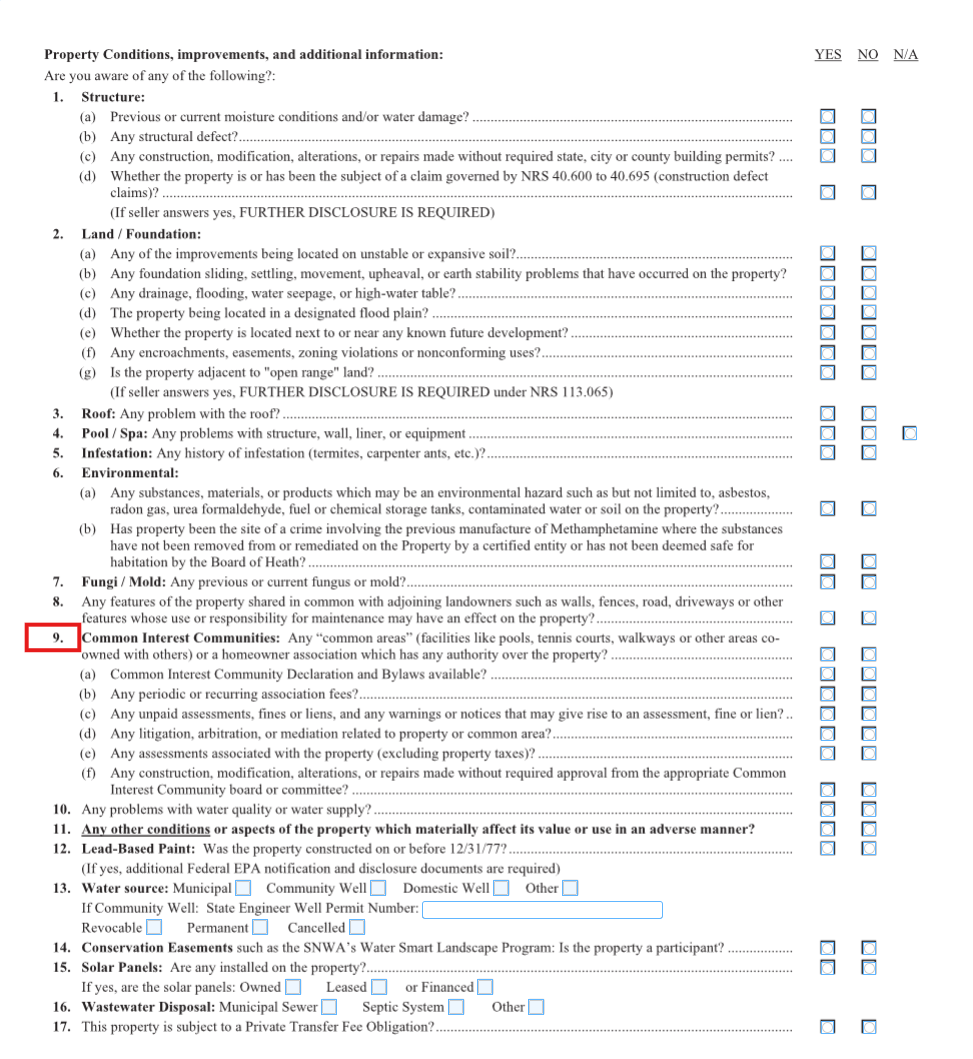
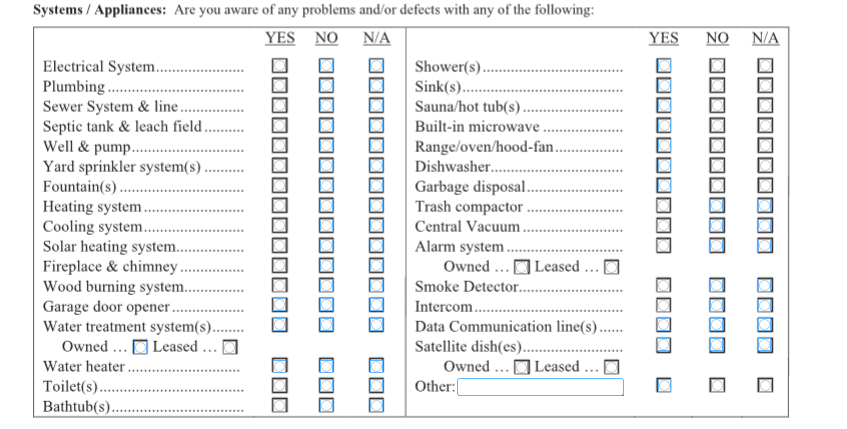
The SRPD is a legally required disclosure that the seller fills out themselves. It tells the buyer about the condition of the property.
- MUST be filled out by the Seller. Never fill this out for them.
- All items must be marked. No blanks.
- Items *9, 9(a), 9(b) must be checked YES if the home is in an HOA.
Part 3 — The Seller Process (Step by Step)
This is the sequence — every listing follows this path:
- Sign documents: Duties Owed, Listing Agreement, SRPD. Prepare the home for pictures.
- Order Media: Use Showingtime+ to order media (photos, video, floorplan).
- Syndicate: Home syndicates and hits the market.
- Activity: Showings, offers, counters, escrow.
- Order HOA items, keep utilities on, give access.
- Closing: Sign the Deed, close, transfer keys, turn off utilities.
Part 4 — Prepping for Pictures
- Decluttered. Counters clear, surfaces clean.
- Personal pictures stowed. Family photos put away.
- Yards manicured. Front and back.
- Blinds open. Maximize natural light.
- The photographer will NOT stage. The seller is responsible for staging.
Part 5 — Pricing
- Not discounted but within Market Value.
- Seller signs off on comps. Always.
- Seller chooses the price. Not you.
- 5% over max comp = request appraisal. If listing 5%+ over the highest comp, request an appraisal first.
Part 6 — Resale Package & HOA Demand
- Required by law: The seller, by law, must provide the Resale Package.
- Ordering timeline: Ordered within 2 days, delivered within 15 days.
- Cost: $200–$400 for the Resale Package. $175–$250 for the Demand.
- Multiple HOAs: Verify if there are multiple HOAs (sub + master).
Part 7 — Commissions
- NET is more important than %. Run the math on what the seller actually nets.
- Includes CO-OP currently. Co-op compensation is part of the commission conversation.
- Doctors don’t discount. You are a professional — don’t cut your rate to win the listing.
- $195 transaction fee applies to Listings too. Charge it on both sides.
🎯 Your Goal
Every line of the Listing Agreement is filled out correctly, the SRPD is signed by the Seller, you have verified HOA status and balance, and the seller has signed off on price and comps before the home hits the market. 100% signatures or we don’t accept the listing.
📧 Hard Rule — Email [email protected] on every listing
Before you send the Listing Agreement, SRPD, or any addendum to the seller for signature, email it to [email protected] for broker review. Same rule for any deal-specific question — call or email brokers@. It catches mistakes before the seller signs and keeps everything on record.
🛠️ Ylopo Tools for Listings — Use These to Win Appointments
These Ylopo branded-site tools are your edge at listing appointments and on active listings. Bookmark tools.scofieldgroup.com — full hub with every tool.
🔥 Heatmap (Buyer Database) — Win the Listing
tools.scofieldgroup.com/heatmap
How to use: Pull it up on your phone IN the listing appointment. Show the seller live how many active buyers are searching their neighborhood through your funnel. Concrete proof beats every “I have buyers” claim other agents make.
Where: Listing appointments, FSBO calls, expired listing convos.
📊 Branded Market Trends — Pricing + Price Reductions
tools.scofieldgroup.com/branded-market-trends
How to use: Text the link before the listing appointment so the seller arrives educated. Use the live data during the appointment to justify your pricing recommendation. Send weekly to stale listings as the setup for a price-reduction call.
Where: Pre-listing prep, listing appointments, monthly seller check-ins, price-reduction conversations.
📋 Single Listing Flyer — Launch Day Collateral
tools.scofieldgroup.com/single-listing-flyer
How to use: Generate a polished flyer for every new listing. Drop it in your stories, text it to your buyer pipeline, leave a stack at open houses.
Where: Day-of launch, open houses, buyer-pipeline follow-up, social posts.
📑 Listing Detail — Your Branded Listing Page
tools.scofieldgroup.com/listing-detail
How to use: Share THIS link instead of Zillow or MLS. Every click stays in YOUR funnel, on YOUR site, with YOUR branding. Built-in lead capture.
Where: Every text or email about your active listings. Never share Zillow when you can share branded Listing Detail.
🏠 Open House — Touchless Registration
tools.scofieldgroup.com/open-house
How to use: Print the QR poster for every open house on your listings. Every walk-in scans the code — registration in seconds, leads flow directly into FUB tagged with the property.
Where: Every open house, every time. Replaces the clipboard.
📘 Quick-start guide: Ylopo Branded Sites Tools walkthrough
🆘 Tool not working? Ylopo Support Center · [email protected] · (844) 359-5493
📁 Listing Resources — Bookmark These
Every doc and page you need to run a listing the SG way. Save these to your phone home screen and your browser bookmarks.
🏆 Zillow Showcase
- Zillow Showcase Mastery — Your Listing Closer (LMS lesson) — Full training on positioning + closing with Showcase.
- scofieldgroup.com/zillow-showcase — Public-facing Showcase page — share this with sellers before/after listing appointments.
- Win the Listing with Showcase (PDF) — Print-ready leave-behind for listing appointments.
📋 Forms + Contracts
- SG Listing Agreement — Exclusive Right (v1) (PDF)
- Duties Owed Form (NV) (PDF) — Signed FIRST, every time. See Duties Owed lesson.
- Consumer Choice Disclosure (PDF)
🛠️ Tools
- tools.scofieldgroup.com — Ylopo Branded Site tool hub (Heatmap, Branded Market Trends, Single Listing Flyer, Listing Detail, Open House).
📂 Drive backup: Need the source files? Pull from the Scofield Group Drive: CLAUDE PROJECTS → Stellar Sites Build. Email [email protected] if you need access or the latest version.
🚀 Ylopo DYVA — Listing Rockets
Turn any listing into a 3D animated video ad + targeted Facebook campaign in minutes. Auto-pulls photos from MLS. Leads route straight to your Follow Up Boss. SG runs this on every active listing — and you should too.
From MLS Number to Live Facebook Ad in 3 Steps
🎯 Smart Targeting — Who Sees Your Ad
- Homeowners near your listing — virtual door-knocking at massive scale. Every neighbor sees your brand.
- Big data buyers — Ylopo licenses real estate search data from Zillow, Realtor.com + their private buyer database.
- Your FUB pipeline — buyers in your Follow Up Boss who match the listing get notified automatically.
- Facebook’s active buyer audience — Facebook’s targeting layered on top of Ylopo’s intent data.
⚡ 3 Power Moves — When to Launch a DYVA
- Launch day-one when listing goes live
- Target every homeowner in the neighborhood
- Impressive seller reports from day one
- Leads route to your FUB account
- Build neighborhood buzz before the event
- Drive foot traffic + online leads
- Hit hundreds of nearby homeowners
- Look like the most active agent in the area
- Announce every sale to the whole neighborhood
- Show homeowners you don’t just list — you sell
- Dominate your farm area
- Generate seller leads from ready-to-move owners
📊 The Seller Report — Your Listing Appointment Weapon
- Real-time dashboard — share with sellers so they see exactly what you’re doing.
- 30-day performance forecast — projected views & leads laid out in advance. Sellers love this at listing appointments.
- CRM buyer matching — shows sellers how many buyers from your database match their home. Huge differentiator vs other agents.
- Auto-routed leads — every inquiry goes directly into your Follow Up Boss as the agent.
Part 8 — Launch and Offers: the SG Hub Listing Offer Tool
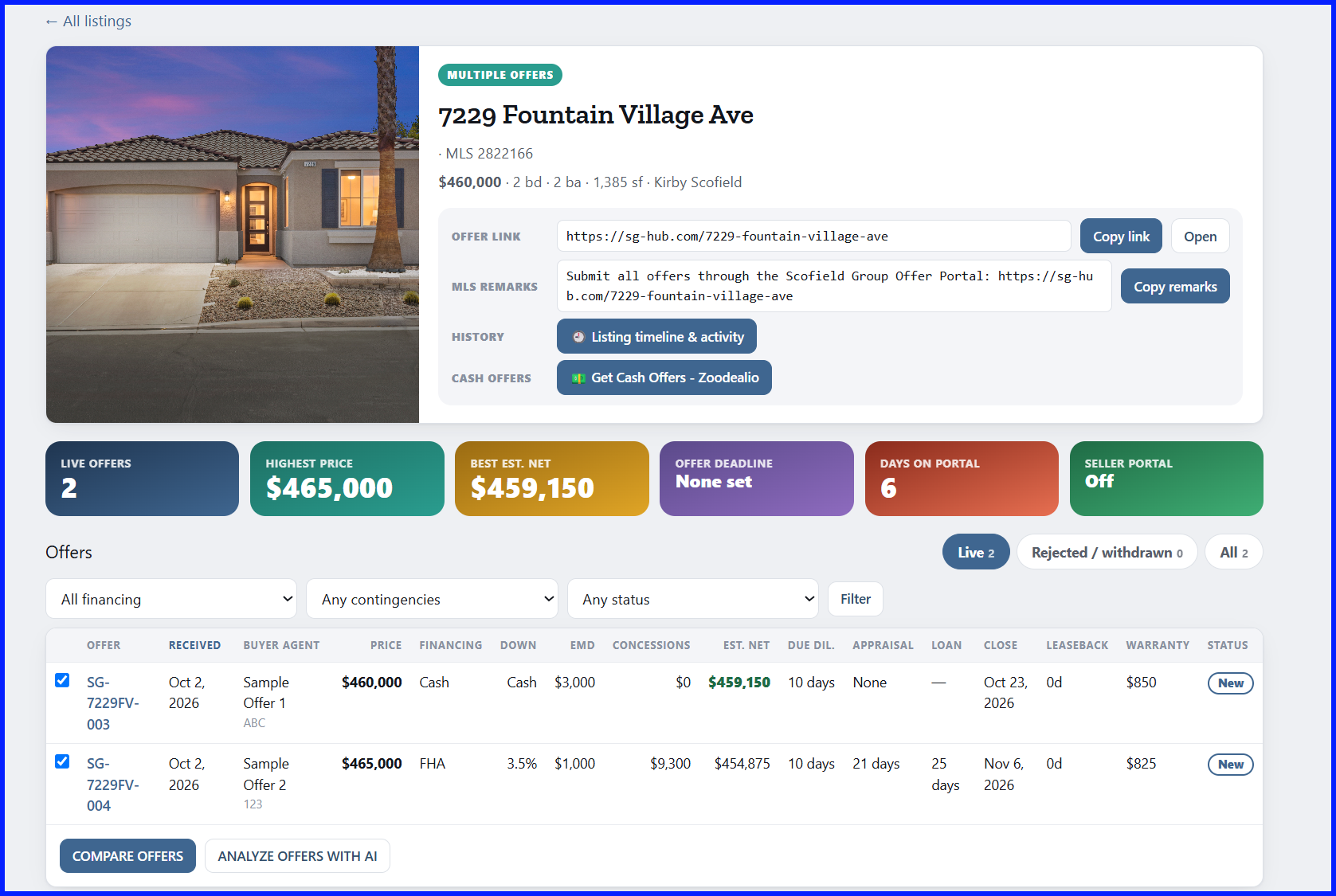
Every listing gets a public offer page in SG Hub. Every offer comes in there. Full walkthrough: SG Hub Lesson 15.
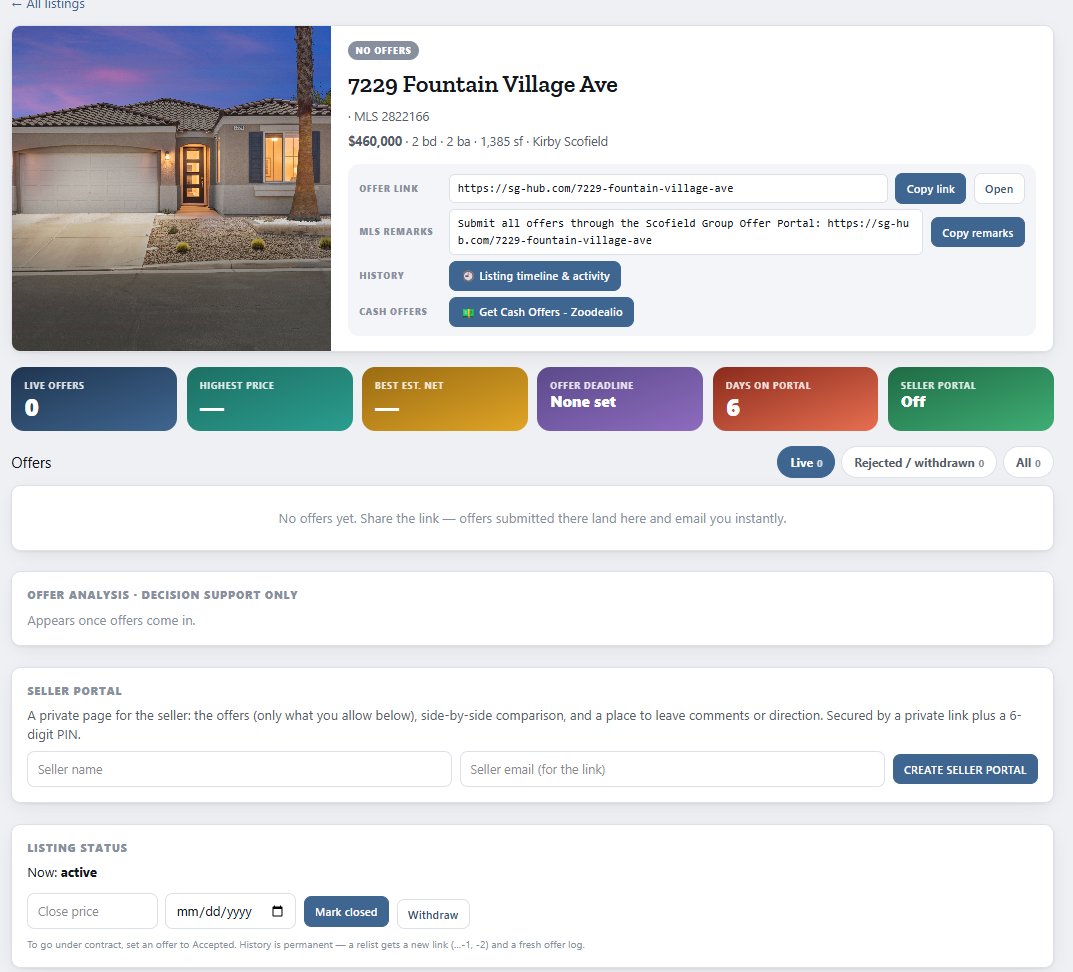
At launch
- Your listing’s public offer page is sg-hub.com/<address>.
- In SG Hub → Listing Offers, click Copy remarks and paste into the MLS Agent-to-Agent Remarks: “Submit all offers through the Scofield Group Offer Portal: <link>”.
When offers come in
- Buyer agents need no login. They upload the signed offer plus a pre-approval (financed) or proof of funds (cash).
- They get an emailed receipt with an offer ID (e.g. SG-7229FV-004).
- You get a “New Offer Received” email and a notice on Home.
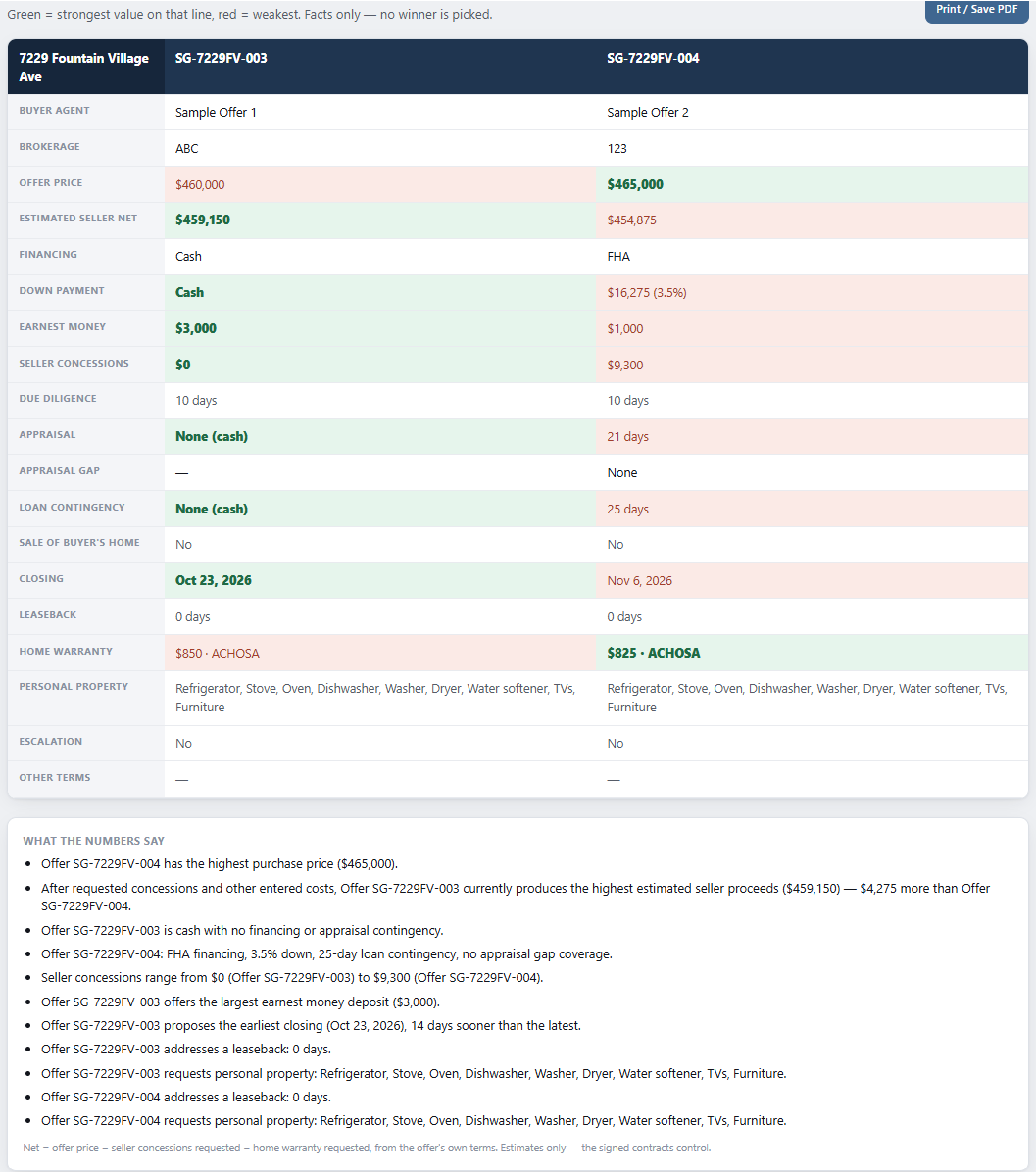
- Listing Offers shows every offer, estimated seller nets, a side-by-side comparison and a factual analysis — never a recommendation.
- Record counters, accept one (the listing goes under contract) and ask the others about backup.
Example: comparing two offers
A listing with two live offers. Tick the offers you want, then click Compare Offers or Analyze Offers with AI.
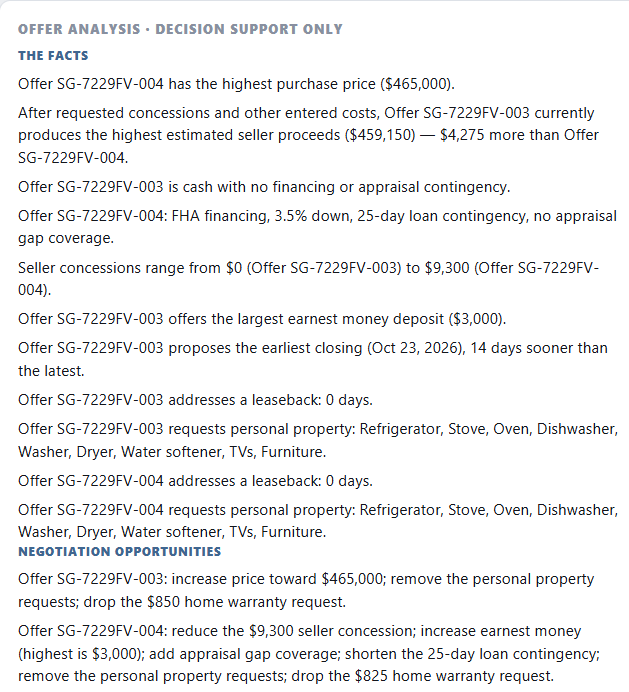
Tip: re-run the analysis after every new offer or counter, so it matches the offers on screen before your seller sees it.
Seller communication
- Create seller portal gives the seller a private link plus a 6-digit PIN.
- You control what the seller sees. Seller direction comes back to you in SG Hub.